🌲 WTSFest Portland - May 2026 | 🥨 WTSFest Philadelphia - Oct 2026 | 🎥 On-Demand Video Hub - 2026
🌲 WTSFest Portland - May 2026 | 🥨 WTSFest Philadelphia - Oct 2026 | 🎥 On-Demand Video Hub - 2026

Author: Nourhan Gamal
Last updated: 06/04/2026
App store pages play a critical role in how users perceive an app, and whether or not they elect to install it. As a result, both Apple and Google have evolved their platforms to give greater control over how apps are presented to different audiences.
Custom Product Pages (CPPs) on the Apple App Store and Custom Store Listings (CSLs) on Google Play have transformed how apps are presented to users. Instead of relying on a single, static store page, you can now tailor visuals and messaging based on user intent and acquisition source, creating more relevant, targeted, and conversion-focused store experiences.
In this article I’ll be covering:
Before installing an app, users typically:
Because users arrive with different intents, a single store page may not always communicate the most relevant value proposition. Custom Product Pages (CPPs) on the Apple App Store, and Custom Store Listings (CSLs) on Google Play are designed to address this challenge by aligning store content more closely with the user’s expectations. I’ll deal with each of them in turn.
Custom Product Pages (CPPs) are alternative versions of an app’s Apple App Store product page that allow you to tailor the store experience for different audiences.
Instead of directing all users to the same page, CPPs enable teams to create multiple customized pages, each focusing on a specific feature, use case, or marketing campaign.
An app can have up to 70 custom product pages. Each CPP:
Custom Product Pages allow partial customization while keeping the core app listing consistent.
You can customize:
CPPs enhance user understanding of an app by displaying only the information most relevant to their needs.
Key Benefits:
The Apple App Store shared this example to demonstrate the power of CPPs: State of Survival saw conversion rates increase by 33%, and cost per install reduced by 14%.
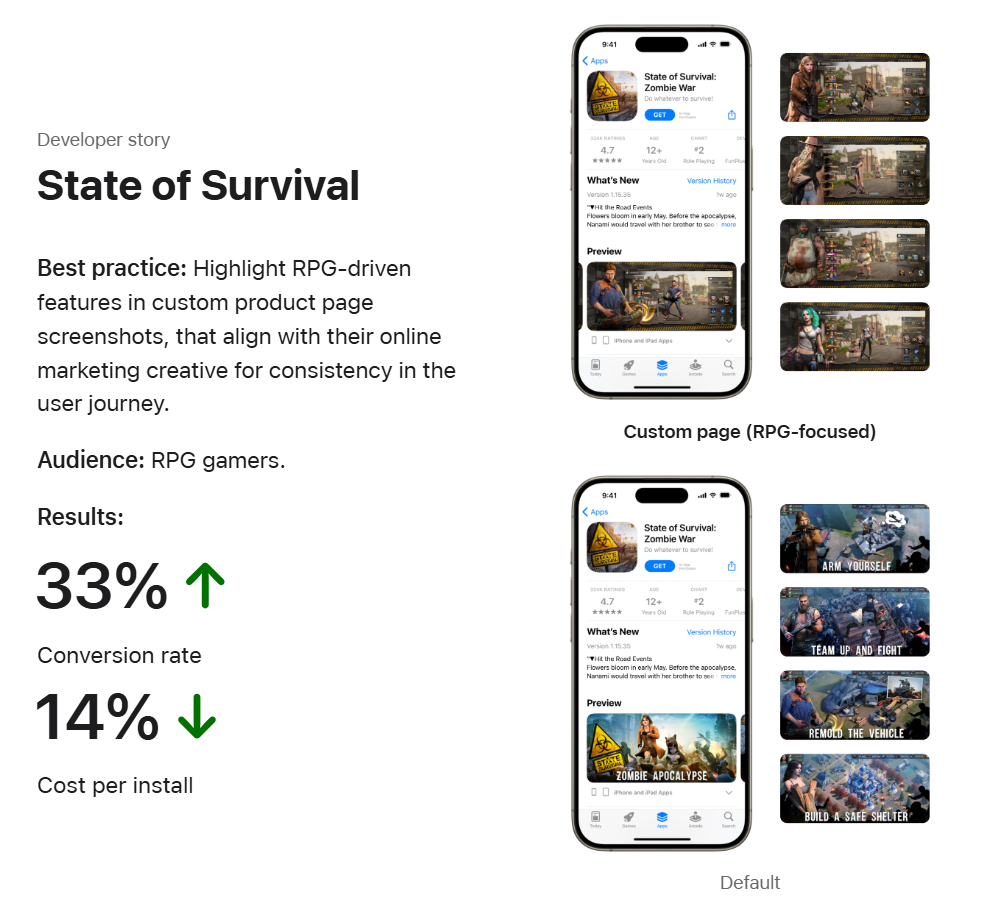
How CPPs can increase conversion rates & reduce cost per install, image source: Apple App Store
According to AppTweak’s analysis, apps using CPPs for Apple Search Ads saw: 8% higher conversion rates for games and 6.6% higher conversion rates for apps.
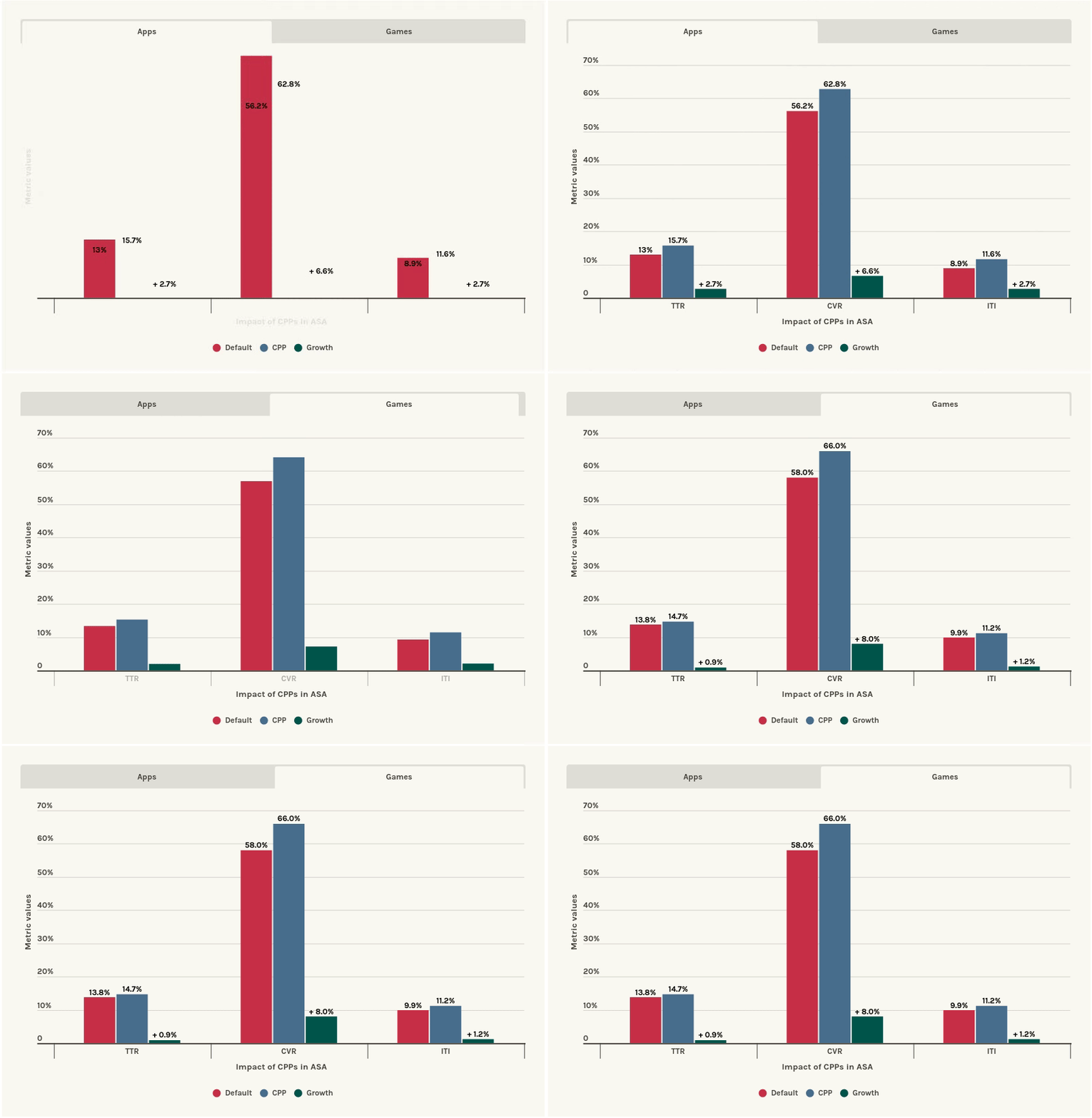
The impact of CPPs in Apple Search Ads, image source: Apptweak
This is easiest to explain with an example.
The “Garden” app offers two main features:
The app’s default product page focuses on Plant Delivery, which is the main feature presented to users. To better target users who are specifically interested in gardening advice, the app created a Custom Product Page (CPP) for the Gardening Tips feature.
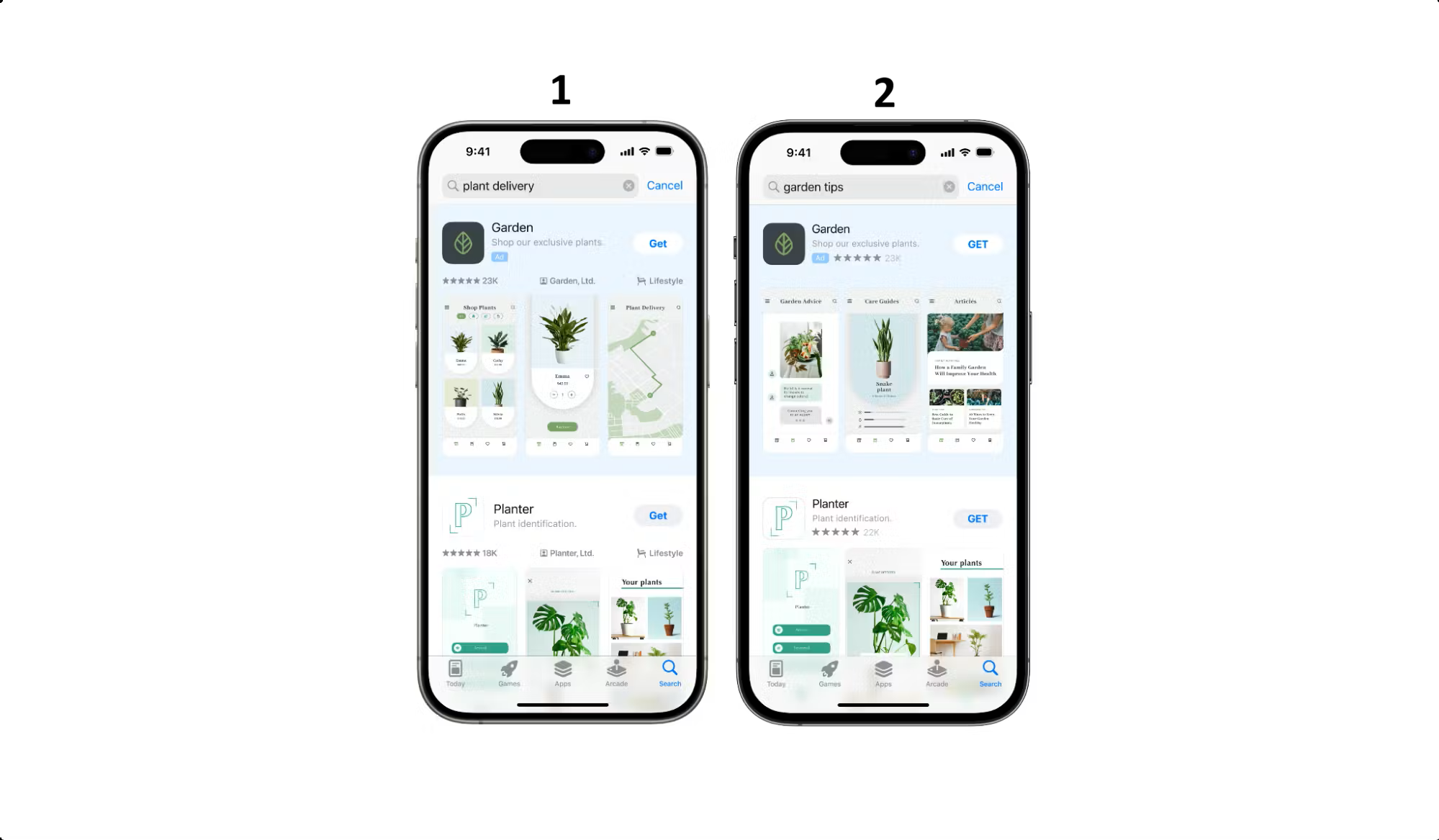
Matching User Intent with Custom Product Pages, image source: Apptweak
As you can see in screenshot 1, when users search for “plant delivery”, they are directed to the default app product page. In this case, the screenshots emphasize the plant shop, product selection, and pricing, which align with users who are looking to buy plants. Since the default page already serves this intent, no custom page is needed.
In screenshot 2, you can see that when users search for “garden tips”, they are shown the Custom Product Page instead of the default listing. The screenshots here highlight the Garden Tips feature, such as educational content and blog-style tips related to gardening. This tailored messaging directly matches the user’s search intent, making the app more relevant and increasing the likelihood of installation.
Many app users have different goals, and, as such, showing the same product page to everyone may not fully address their needs.
Let’s take fitness apps as an example. App users in this space might have a range of diverse goals, e.g. building muscle, losing weight, improving cardiovascular fitness, gaining flexibility, etc. To address this issue, a fitness app could elect to create separate Custom Product Pages for different audience segments in order to align the App Store experience with users’ fitness goals.
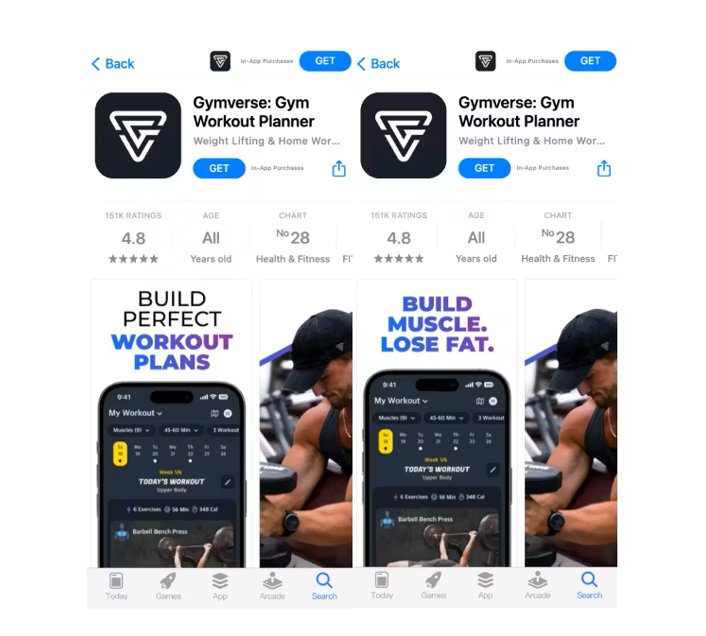
Creating CPPs Based on User Segmentation, image source: Apptweak
These 2 examples were sourced from AppTweak. Check out their article for more CPP examples.
You can also create a CPP to highlight a specific feature of your app. Then, you can share that CPP link on social media, in blog articles, emails, or other channels. Anyone clicking that link will go directly to that CPP page in the App Store, with your tailored screenshots, videos, and messaging; and no paid campaign is required.
1. Set your objectiveDecide which user group or campaign you want to target and determine which app features or benefits to emphasize.
2. Highlight relevant contentChoose screenshots and videos that showcase the features or promotions important for your audience. Add brief, clear copy that supports the visuals.
3. Stick to App Store rulesDouble-check that all visuals and text follow Apple’s guidelines to prevent rejection.
4. Share with a unique linkEvery custom page has its own URL. Use this in ads, social media, emails, or influencer campaigns.
5. Consider localizationIf targeting multiple regions, translate text and adjust visuals to fit local preferences.
6. Link to ads for maximum impactConnect your custom page to campaigns in Apple Search Ads to ensure users see the most relevant content.
To get the most value from Custom Product Pages:
Key ways to evaluate impact include:
According to the Apple App Store, the performance of Custom Product Pages can also be measured as follows:
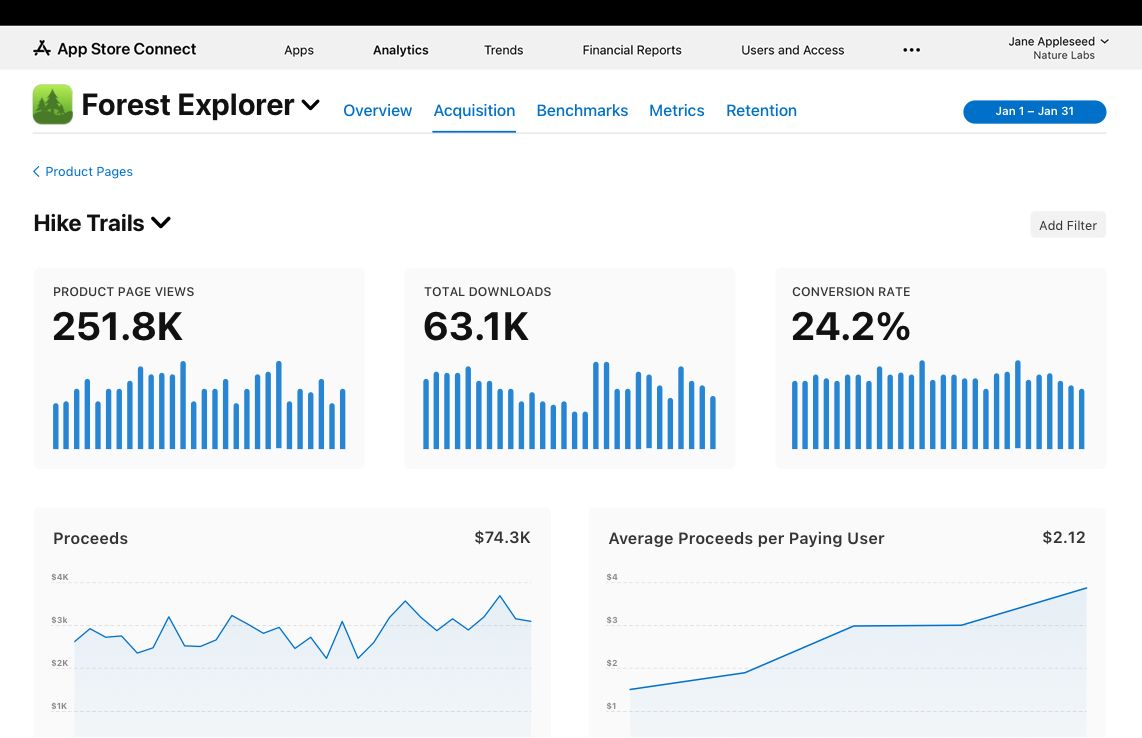
How to Measure the Impact of Custom Product Pages, image source: Apple App Store
Custom Store Listings (CSLs) are alternative versions of your app’s Google Play Store page that allow you to drive users to tailored store listings by country, install state, search keyword, or campaign, using unique listing URLs.
Google Play supports up to 50 Custom Store Listings, which means you can create an alternative store listing page with a different:
As we’ve discussed previously, not all users have the same expectations when visiting your store page. CSLs help bridge this gap by delivering more relevant messaging and visuals, which can significantly improve conversion rates.
Localization: Content can be localized for different regions, with text and visuals tailored to local audiences.
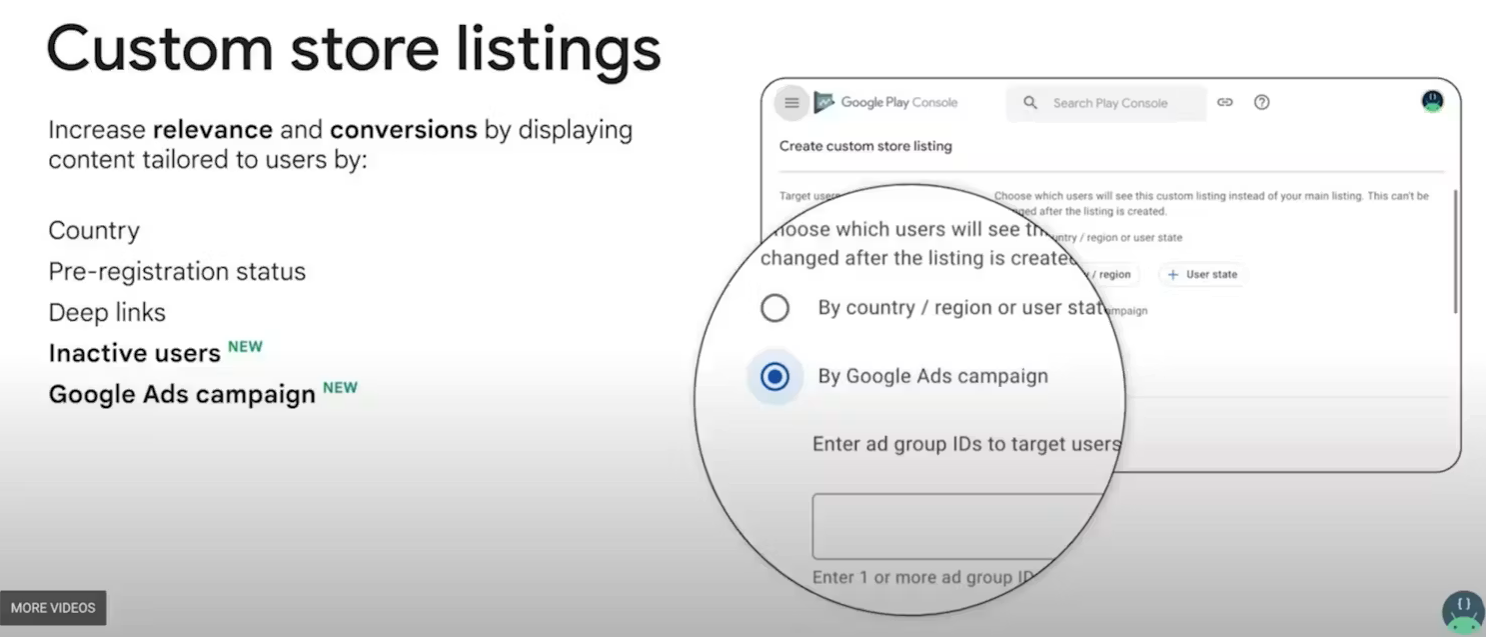
How to Build an Effective Custom Store Listing?, image source: Google Play
Before creating a Custom Store Listing, the first step is to decide which type of targeting you need. Below are the main CSL targeting options available on Google Play:
Then, to create a CSL, open the Play Console, select your app, and navigate to Grow > Store presence > Custom store listings in the left-hand menu, then follow the setup steps.
According to Google Play, the following are best practices for using Custom Store Listings:
Check out what Koo did to overcome their challenges and achieve a 15% increase in organic installs with custom store listings on Google Play.
While both features aim to customize store experiences for different audiences, capabilities and use cases differ by platform.
Apple App Store (Custom Product Pages)
Google Play Store (Custom Store Listings)
Traffic source: Works for both organic traffic and paid campaigns.
Custom Product Pages and Custom Store Listings give us the tools to present more relevant, focused, and intentional store experiences. When used strategically, they align acquisition messaging with store presentation, improve conversion, and enable a more scalable, data-driven approach to app store optimization (ASO) over time.

Nourhan Gamal - SEO & ASO Manager, ACXIOM MENA - IPG
Nourhan is an SEO and ASO Manager with 6 years of experience in SEO and 5 years in ASO. Throughout her career, she's worked across multiple industries, helping brands improve visibility, rankings, and performance through strategic, data-focused growth solutions.
ZipSprout connects brands with local nonprofits and events to build sponsorship links that drive local SEO and community impact.
Since 2016, they’ve facilitated 25,381 placements with community organizations across the US, raising over $9.2M in sponsorships.

We pay our authors, speakers & team to bring you helpful content like this.
We aim to always keep our content and community free and accessible.
If you've found value in WTS, please consider supporting us through our Buy Me a Coffee initiative.