🌆 18 days until WTSFest Philly
⏳ & London early bird tickets close end of month
🌆 18 days until WTSFest Philly
⏳ & London early bird tickets close end of month

Author: Julia Bocchese
Last updated: 15/06/2026
Pinterest is more than just a place to get ideas for your wedding or home decor projects. If you’ve dismissed Pinterest as just a platform for gathering creative ideas or crafts to make for #PinterestFails, you may be leaving a significant traffic channel on the table.
I can definitely see why Pinterest gets dismissed as just a fun platform for inspiration, but it can be a great source of traffic, email subscribers, and customers for a variety of businesses.
Why? Pinterest isn’t just another social media platform. It’s a search engine at its core. And once you understand it through that lens, you’ll realize that the SEO skills you already have are exactly what you need to get results from Pinterest. You don’t have to learn a new platform from scratch; you can use your SEO skills in a new way!
In this article I’ll explain why Pinterest deserves a place in your marketing strategy, and how to make it work for both B2B and B2C businesses.
The most important mindset shift when approaching Pinterest is understanding how people actually use it. On social media platforms like Instagram, Facebook, or Threads, people mostly scroll through their feed to see what the people they are following are sharing. Engagement is social with likes, comments, and follows. Sure, folks also search on these platforms, but it’s not the default behavior. But on Pinterest it is.
The majority of people who go to Pinterest are searching for something specific. They search keywords and keyphrases because they want a matching result. That’s search behavior, not social behavior.
Pinterest users come to the platform to plan, research, and/or purchase, 85% of Pinterest users have bought products or services from a pin. And the good news for small businesses is that 96% of searches are unbranded. Pinterest users aren’t just passively consuming content or mindlessly liking posts without actually reading them; they’re actively searching for solutions, products, services, and information. That high-intent audience is exactly the kind of traffic that converts, and many times, it’s the same audience you’re trying to reach via Google.
To surface relevant search results, Pinterest’s algorithm looks at pins, boards, and profiles based on keyword relevance, content quality, engagement, and how well the content matches what users are searching for. (I’m sure this all sounds familiar to anyone doing SEO!)
One of the biggest misconceptions about Pinterest is that you have to be a visual business to get results. Businesses like photographers, interior designers, and florists can perform well, of course. But Pinterest works for a much wider range of businesses than people may think.
The big requirement isn’t beautiful photos. It’s content. If you have blog posts, podcast episodes, portfolio pages, videos, guides, email content, etc., you have something to put on Pinterest.
Some of the categories that consistently perform well include home and design, food, fashion and beauty, health and wellness, finance, and education, but don’t let that limit your thinking. Some of the most impressive Pinterest results I’ve seen have come from outside the obvious categories because they had such little competition on Pinterest.
One of my best performing clients was a company that created training videos for Olympic-level swimmers. It was very specific, highly technical content for the most elite athletes, and their content knocked it out of the water (pun intended). I started their account from scratch, and within a few months, they were getting a few thousand visits to their website from Pinterest each month.

Examples of pins created for a range of swim training videos.
I also worked with a boarding school in Switzerland and did some Pinterest audit work for a luxury yacht company, and both had success reaching a large audience who was searching for exactly what they had to offer.

Examples of pins created for a boarding school in Switzerland
Pinterest’s algorithm works by trying to match user search queries to the most relevant, high-quality content (or “pins”) available. It’s a little different from Google, but the core concept is the same. With the pins that you add to Pinterest, you need to tell the platform clearly what the content is about, and it needs to be high-quality and useful to users.
You can use keywords in several different places on Pinterest: in your profile name and bio, on board titles and board descriptions, on pin titles and pin descriptions, and in the alt text of the pin images. And if you’re using graphics for your pins (such as text over a photo), you can use keywords in the pin design itself. You can see some examples of well-optimized pins below.
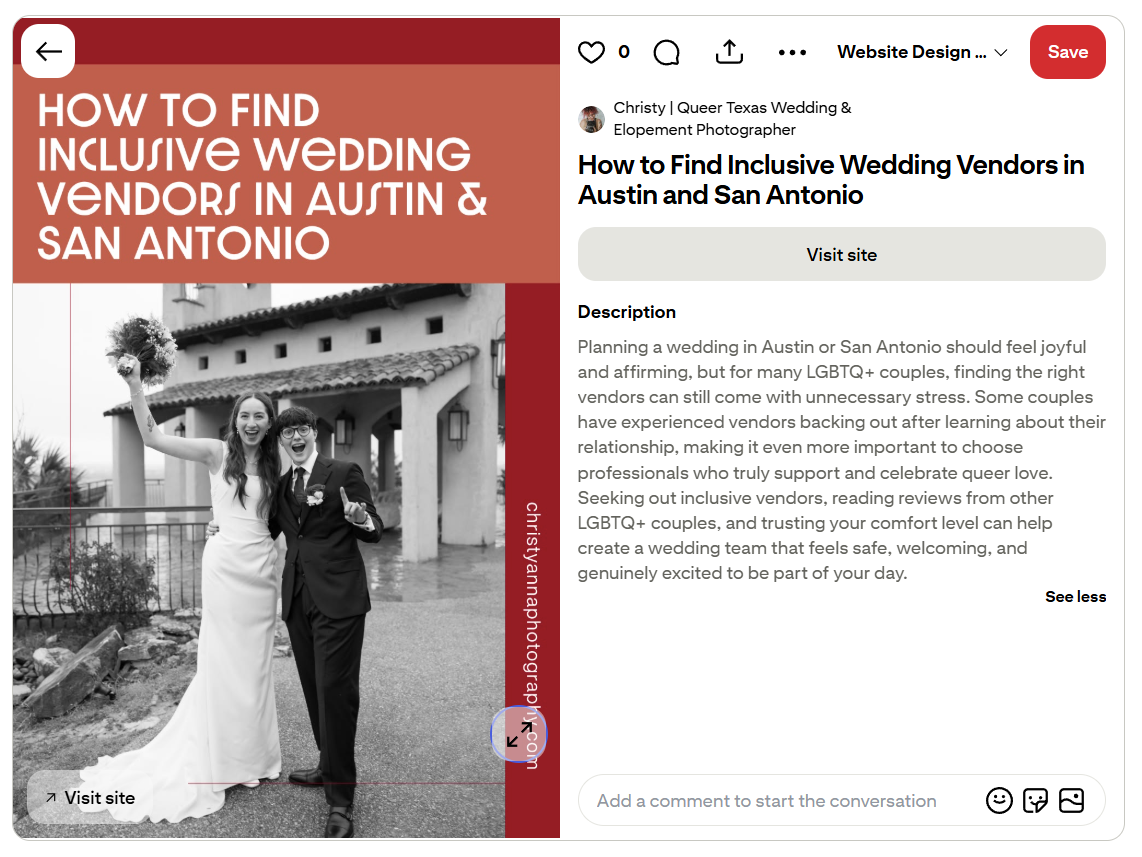
An example pin created for a guide to inclusive wedding vendors.

An example pin created for a luxury drawer handle company.
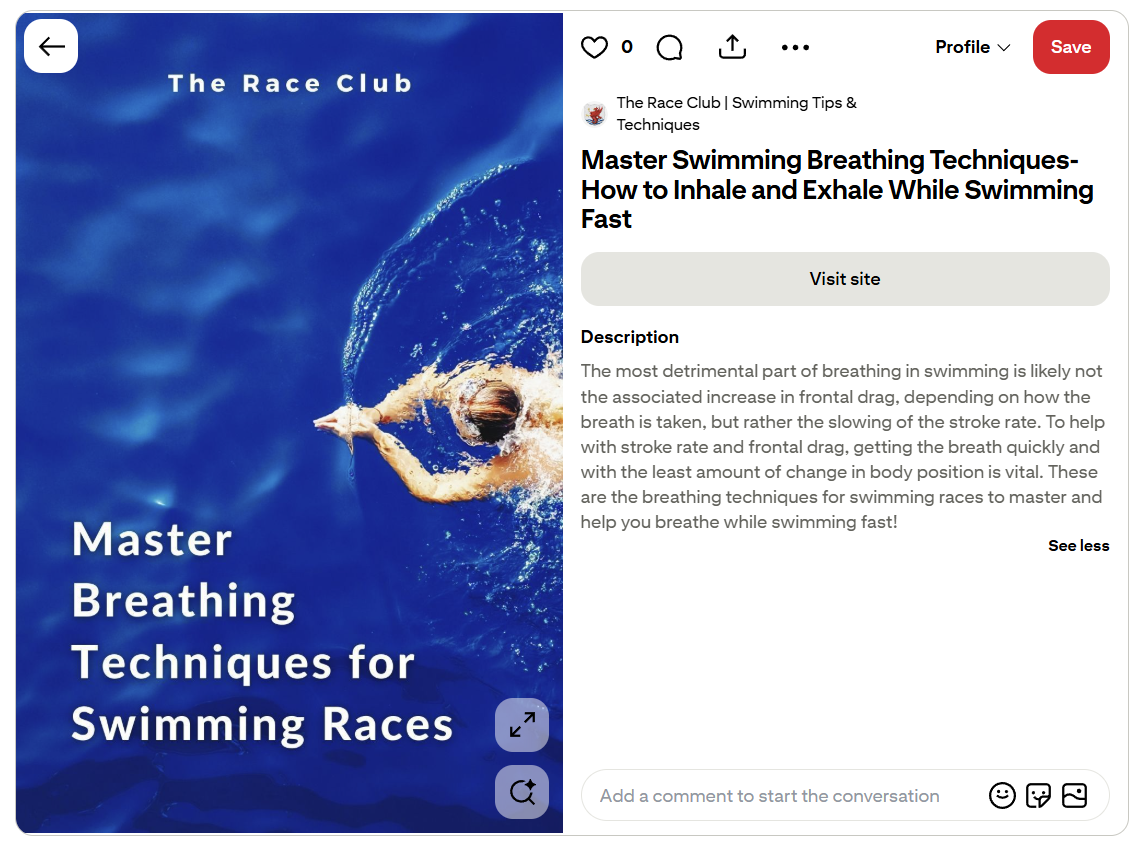
An example pin created for a guide to breathing techniques for swimmers.
The same keyword research principles for SEO apply to Pinterest as well. You need to understand how your ideal audience is searching and what types of content they’re interested in. Long-tail keywords perform particularly well on Pinterest because the platform’s search is specific and intent-driven. For example, someone searching for “leadership development books for women” is telling you exactly what they want.
Since the majority of searches on Pinterest don’t include a brand name, this means that you’re competing on content relevance and keywords, and not on brand authority, which means that small businesses have an opportunity to outperform larger companies.
The good news for SEOs is that you don’t need to start your keyword research strategy from scratch for Pinterest. The information you’ve already gathered — service or product terms, long-tail phrases, location modifiers, audience-specific language — translates to Pinterest very similarly.
Pinterest does have their own free keyword research tool called Pinterest Trends, but it doesn’t have as much data as SEO keyword research tools. It tends to only have information for general searches, but it is at least a good starting point.
You can start by identifying which content keywords in your current keyword research list match high-intent searches on Pinterest, and then use Pinterest Trends or Pinterest’s search bar to check them. On Pinterest, you can start typing in a keyword and see what they start to autopopulate for related searches.
After finding some relevant keywords for a piece of content, use them in the pin title, pin description, and pin design. Just like with SEO, you can use keyword variations. And unlike with SEO, you can do a lot more testing because you can create multiple pins that link to the same piece of content. This means that you can test out different keywords and different pin titles to see what resonates the most with your audience on Pinterest.
It’s worth noting that keyword stuffing is just as ineffective on Pinterest as it is on Google. Make sure the titles and descriptions read naturally and provide content about the content to get viewers interested in visiting the website to learn more.
Here’s the perk that makes Pinterest really stand out from other social media platforms: longevity.
A post on Instagram or Facebook gets seen for a day or two, maybe a little longer if you’re lucky. But a pin on Pinterest can drive traffic for months or even years! I’ve had clients with pins that are several years old that are still sending traffic to their websites today.
Because Pinterest functions as a search platform rather than social media, pins don’t have an expiration date. When someone searches for a relevant keyword three months or three years after you posted a pin, your content is just as discoverable as the day you posted it (as long as you did your pin optimization work well). The traffic from that pin compounds over time the same way a well-ranking blog post does.
If you’re already creating content as part of your SEO strategy, Pinterest is a great platform to give that content an even longer shelf life and help increase your ROI.
Every blog post or other piece of content on the website can be turned into multiple pins. A well-designed graphic that represents the post’s topic, paired with a keyword-optimized pin title and description and linking back to the post, is all it takes to get that content that you’re already creating in front of Pinterest’s search audience. So the post you may have spent hours creating to attract organic search traffic can also attract traffic from Pinterest.
This is especially important for informational content like how-to posts, guides, educational content, podcast interviews, product reviews, or listicles because they are the formats that match what the users on Pinterest are searching for.
For businesses with years of content already built up, Pinterest is a great opportunity to get fresh traffic to older content. I recommend auditing existing content for Pinterest-worthy posts and building a pinning strategy around the best performers – it’s a great way to extract additional value from content that’s already been produced.
Beyond traffic and lead generation (which are already great benefits of Pinterest), Pinterest also helps build brand authority. And it does it in ways that support your broader visibility strategy.
I’ve worked with clients who wanted to use Pinterest to get in front of magazine editors for more features, and one client just wanted to make sure her name was associated with her particular style of art when people searched for it. So there are benefits for brands to use Pinterest beyond website traffic.
Journalists, magazine editors, and content curators are actively using Pinterest to find businesses to feature and partner with. I’ve worked with clients whose products or designs have been featured by national publications after being found on Pinterest. That kind of organic press exposure is hard to come by, but it becomes possible when your content is well-optimized and showing up in the right search results.
For businesses that are trying to build credibility in a competitive space, Pinterest is one of the most underestimated tools available. It’s not just about getting traffic. It’s about showing up consistently, in multiple places, for the topics you want to be known for.
I recommend tracking your Pinterest traffic in Google Analytics to see the engagement once people land on your website, but Pinterest also has their own analytics for tracking a few different things with your account’s performance.
I wouldn’t focus too much on impressions because they're a vanity metric, but they are important to track at the beginning to make sure your pins are gaining traction and being seen. I recommend focusing on outbound clicks, saves, link click rate, and save rate. These tell you whether your content is actually driving traffic and engagement. Then look at your top performing pins sorted by those same metrics, and watch for patterns in topics, designs, and keywords. If something is consistently outperforming everything else, create more content in that direction.
Just like SEO, Pinterest can be a slow burn, and you can expect about 1-5% monthly growth. The results compound over time, which is exactly what makes it such a strong long-term traffic channel.
Pinterest is an extension of the SEO work you’re already doing, on a platform with a high-intent audience and content longevity.
If you are already creating blog content, focusing on SEO, and trying to build sustainable visibility, Pinterest is the perfect next step. And if you’re an SEO, your keyword research, content strategy, and search intent skills are exactly what it takes to get results on Pinterest!

Julia Bocchese - Founder, Julia Renee Consulting
Julia Bocchese is the founder of Julia Renee Consulting, a Philadelphia-based SEO, Pinterest, and AI search consultancy serving small businesses in the creative and holistic industries. With nearly a decade of experience, 270+ clients across 11 countries, and a background as the first SEO professor at Drexel University, Julia helps small businesses get found on Google, Pinterest, and AI platforms and turn that visibility into consistent leads.
ZipSprout connects brands with local nonprofits and events to build sponsorship links that drive local SEO and community impact.
Since 2016, they’ve facilitated 25,381 placements with community organizations across the US, raising over $9.2M in sponsorships.

We pay our authors, speakers & team to bring you helpful content like this.
We aim to always keep our content and community free and accessible.
If you've found value in WTS, please consider supporting us through our Buy Me a Coffee initiative.