1 day left to save £200 on WTSFest London 💙 £399 now → £599
1 day left to save £200 on WTSFest London 💙 £399 now → £599

Author: Meriem Nacer
Last updated: 24/11/2025
Product feeds have always been the awkward child of search marketing. They don’t sit neatly in a box. PPC teams use them for Shopping ads, SEO teams tend to ignore them, and clients usually don’t know who’s meant to own them. Which means feeds often get pushed to the bottom of the to-do list.
That’s a mistake. Because feeds aren’t just for paid search. They’re structured product data which include titles, descriptions, attributes, Global Trade Item Numbers (GTINs), images; and how you handle them shapes both your paid visibility and your organic reach.
And here’s the big shift: Google has been pushing feeds harder into organic. Free product listings, richer results, and schema tie-ins mean feeds now sit firmly in the SEO camp as much as PPC. If you’re an SEO ignoring feeds, you’re missing one of the fastest ways to win visibility.
So let’s stop treating them as “someone else’s problem.” This guide breaks down why feeds matter for both PPC and SEO teams, how you can optimise them right now (yes, before Christmas), and why collaboration makes their impact on results even bigger.
At their core, product feeds are just structured product information: titles, descriptions, attributes, GTINs (Global Trade Item Numbers), MPNs (Manufacturer Part Numbers), and images.
GTINs and MPNs help Google match your products correctly across both paid and free listings. Without them, products risk being excluded or miscategorised. There’s a difference between them that’s important to know. A GTIN is a universal product code like UPC, EAN, or ISBN; whereas an MPN is the maker’s own identifier. If you’re new to these, Google’s guide on unique product identifiers is the place to start.
For years, product feeds were seen as “PPC territory.” But that’s no longer true and both SEO teams and PPC teams need to pay attention. Google is rolling out more organic-only features that depend on feeds, which means ignoring them now costs visibility on both sides.
Here’s what’s changed:
The point: feeds are no longer just “ad plumbing.” They’re one of the few tools where SEO teams and PPC teams can make changes in the same place, and both benefit from the optimisation.
For PPC, a well-optimised feed is the difference between paying over the odds for irrelevant clicks and running campaigns that actually work. Better titles and categories mean Google matches your products more accurately, so your ads get shown to the right people. That means better relevance, higher CTRs, and often lower CPCs too. Cleaner feeds don’t just help clicks; they improve your quality score, which feeds back into cheaper, more efficient campaigns.
For SEO, the same feed improvements directly impact organic performance. Cleaner product data helps Google crawl and categorise your site more consistently. Richer listings, especially when feeds and schema play nicely together, mean more visibility in free product results. In short, you look sharper without having to churn out more content.
And here’s the real kicker: the same fixes help both sides. Take a bedding brand that went from the incredibly vague “Luxury Duvet” product title, to “Luxury Goose Down Duvet – King Size.” Now, does that mean Google will only show this product for “king size goose down duvet”? Of course not; it still loves to mix in near matches. But by adding size and material, this brand becomes far more relevant for users actually looking for those details. If someone specifically searches “king size goose down duvet,” the brand is the perfect match. And if someone just searches for “luxury duvet,” the brand still has a shot, but with the bonus of showing extra info to help clicks and improve their quality score.
Optimising a feed doesn’t have to be scary. You don’t need fancy tools, months of planning, or a dev sprint. Some of the biggest improvements come from small, simple fixes that anyone can make. Here are the core fields to focus on, what they are, why they matter, plus where and how to apply those fixes.
What it is: Your product title is the main field Google uses to understand what you’re selling. Think of it as your ad headline and your title tag rolled into one. Beware, the title on your website (the “parent”) isn’t always the same as the title Google ends up using in Merchant Center (the “child”).
Why it matters: If your parent title is vague e.g. “Luxury Duvet”, that’s what gets passed into the Merchant Center. From there, you can add detail with rules (e.g. appending colour or size) but those rules only work if the attributes in your site are clean. If the colour is pulled from the website as “sky blue” for one product and “blue-sky” for another, your titles will end up messy. Same with brand: if the original data is inconsistent, Merchant Center rules won’t save you.
Things to try:
Where to fix it: Ideally in your website so your SEO team benefits too. If not, use Merchant Center rules or a supplement feed to layer in extra detail, just make sure the source data is consistent.
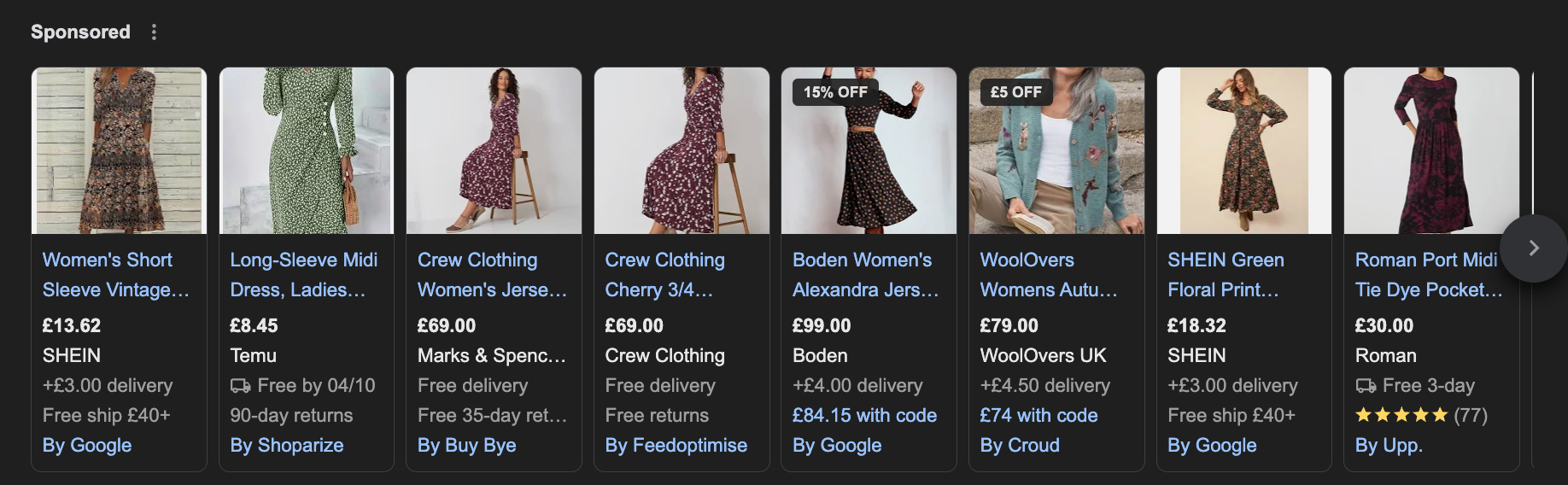
Alt text: A screenshot of Google Shopping ads showing women’s floral and patterned dresses from brands including SHEIN, Temu, Marks & Spencer, Crew Clothing, Boden, WoolOvers, and Roman. Prices range from £8.45 to £99.00, with promotional tags such as “15% OFF” and “£5 OFF” visible on some items.
What it is: Structured data fields like GTINs, MPNs, product category, colour, and size. They sit behind the product but drive how it’s matched.
Why it matters: Attributes are the backbone of your feed. Missing or messy attributes mean products either won’t show at all, or will appear in the wrong place. GTINs are especially powerful, they unlock free listings and better matching in Shopping.
Things to try:
Where to fix it: Usually on your website. Merchant Center rules or supplement feeds are great for patching missing fields, but ideally the data should be clean at source.
What it is: The longer piece of text explaining your product.
Why it matters: Descriptions don’t weigh as heavily in ads, but they do matter for free listings and organic search. They also help persuade customers to click on your listings.
Things to try:
Where to fix it: On your website. Product descriptions live on-site, so writing them well supports both SEO and PPC.
Collaboration tip: This is more of an SEO job than PPC. PPC can flag gaps, but SEOs are the ones who can typically scale keyword-rich, user-friendly descriptions across the site.
What it is: The product image that appears in your ad or free listing.
Why it matters: Your image is your ad. A vague or poor-quality photo kills clicks, no matter how good your title or description is.
Things to try:
Where to fix it: On your website.
Collaboration tip: Sometimes the biggest challenge is client buy-in. PPC teams can prove that poor quality images hurt performance, plus SEO teams can help argue the case from an organic visibility perspective too.
What it is: Merchant Center-only fields you can use to tag products. Customers never see them, they’re purely for campaign management.
Why it matters: Custom labels give you control. You can tag products for seasonality, promotions, or margin, then slice campaigns and reports however you like.
Things to try:
Where to fix it: In the Merchant Center only.
💡 Important note: Don’t try to fix everything at once. Pick one field, make the change, and watch what happens.
Run a feed audit and you’ll see your site laid bare. A feed pulls data straight from your website, so any gaps, inconsistencies, or outright mistakes come shining through. It’s basically your product data holding up a mirror and saying, “look at the mess you’ve been ignoring.”
Common things I’ve found in audits:
Why it matters: These issues don’t just tank your Shopping campaigns. They confuse Google, frustrate crawlers, and make it harder to get clean signals. A messy feed is usually a sign of a messy website structure, which means both PPC and SEO lose.
Collaboration moment: PPC teams spot the wasted spend when bad data pushes ads to the wrong searches. SEO teams see the missed visibility when products don’t appear in free listings. Fixing the feed means fixing both and usually forces a tidy-up of the website along the way.
Where to start:
💡 Important note: The beauty of an audit is that it gives you proof. When you can literally show a client or your team “here’s why half your products aren’t showing up,” it’s much easier to get buy-in for fixing it.
Feed tweaks aren’t just good in theory, they have real-world impact:
Why this matters: These wins come from small but foundational fixes. When your products don’t have correct identifiers (GTIN/MPN/Brand), Google struggles to match them correctly, which reduces both visibility and eligibility. Once those are cleaned up, you unlock visibility in free listings plus more precise matching in Shopping ads.
Cautious note (because reality): If you’re a reseller (or selling the same product as many others), these identifiers are what let you “join the party.” Without them, Google may show competitor products instead. Also, even after adding GTINs, sometimes you won’t immediately see 100% perfect matching, because image quality, title format, and other attributes also influence what shows up.
If you want a quick way to break down silos, start with your feed. This isn’t about fluffy workshops or endless meetings, it’s about two teams working off the same data and fixing the same problems.
Here’s a starter checklist:
The point: A feed is a shared foundation. Treat it that way and you get cleaner data, stronger visibility, and fewer “that’s not my job” arguments.
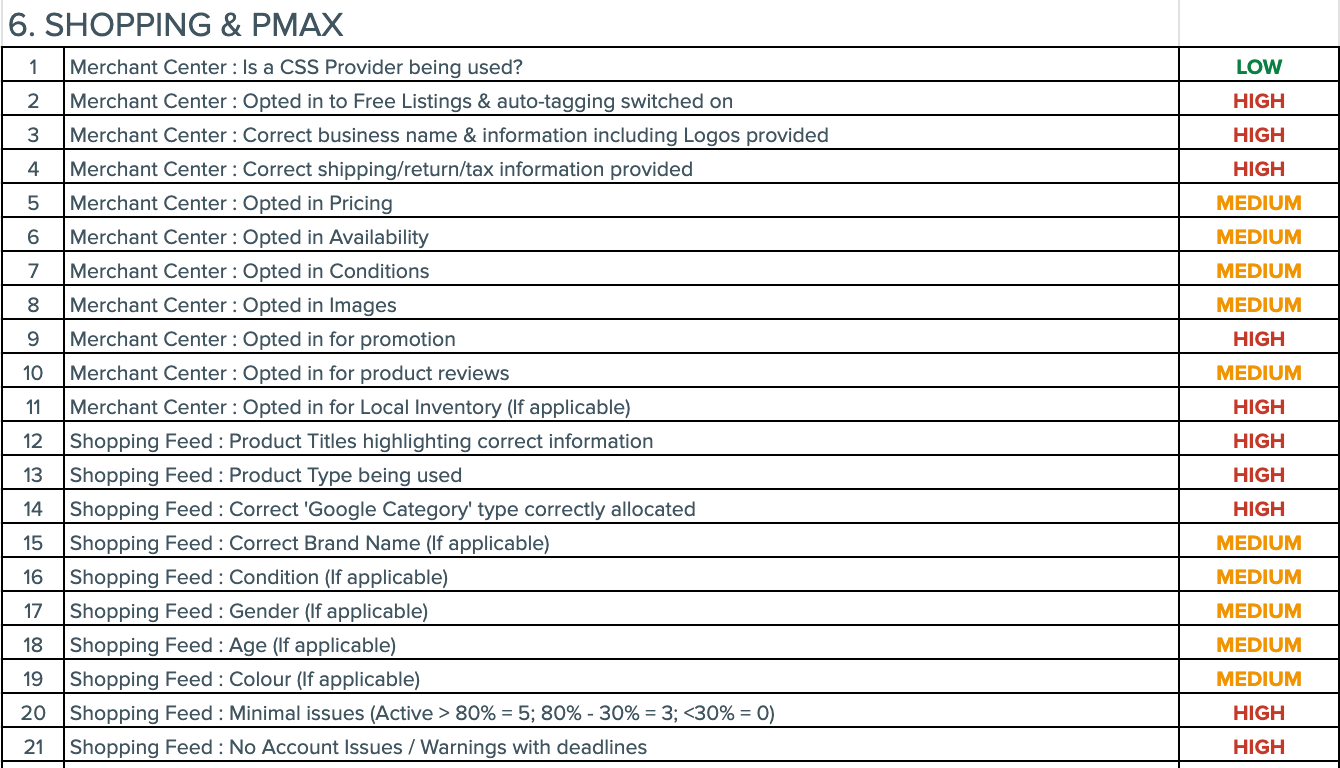
Alt text: A checklist table titled “6. SHOPPING & PMAX” showing 21 Merchant Center and Shopping Feed criteria with priority ratings. Items include settings like “Opted into Free Listings,” “Correct shipping/return/tax information,” “Product Titles highlighting correct information,” and “Correct Google Category type allocated.” Each row is assigned a priority level: LOW (green), MEDIUM (orange), or HIGH (red), with most entries marked HIGH.
Feeds are one of the most overlooked levers in search. They’re the connective tissue between PPC and SEO teams, and they are the one place where both channels can see quick wins. Ignore them, and you waste money and miss visibility. Fix them, and suddenly everything runs more smoothly.
If you’re not sure where to start, here’s what I’d suggest:
That’s it. No 50-page strategy, no endless debate about “ownership.” Just start, test, and learn.
And when it works? Shout about it. Post it in Women in Tech SEO, swap notes with your PPC or SEO teammates, and keep the momentum going. Because the more we treat feeds as everyone’s job, the faster they move up the priority list, and the more love (and budget) they’ll finally get.
Profound helps brands win in generative search. Monitor and optimize your brand's visibility in real-time across ChatGPT, Perplexity, Google AI Overviews, Microsoft Co-pilot, Grok, Meta AI, & DeepSeek.

We pay our authors, speakers & team to bring you helpful content like this.
We aim to always keep our content and community free and accessible.
If you've found value in WTS, please consider supporting us through our Buy Me a Coffee initiative.