🌲 WTSFest Portland - May 7th 2026 | 🥨 WTSFest Philadelphia - October 1st 2026
🌲 WTSFest Portland - May 7th 2026 | 🥨 WTSFest Philadelphia - October 1st 2026

Author: Shannon Vize
Last updated: 16/01/2026
The rise of AI-driven search has introduced a new, non-negotiable requirement for online visibility: AI crawlability.
Before an answer engine can mention or cite your brand, its crawlers first have to be able to find and understand your content. If they can't, your brand is effectively invisible in AI search, no matter how strong your traditional SEO performance has been.
In this article, I’ll be breaking down this new challenge, exploring how AI crawlers work, what blocks them, and showing you how to determine the extent to which your site is being crawled and understood by AI.
It’s important to understand how AI crawlers differ from search engine crawlers (used by Google, Bing, etc) in order to gain the insights you need to maximize your presence in AI search.
One major difference between AI crawlers and search engine crawlers is in how they approach JavaScript. JavaScript (JS) is a programming language commonly used to create interactive features on websites. Think: navigation menus, real-time content updates, and dynamic forms. Brands will often rely on JavaScript to enhance user experience or deliver personalized content.
Unlike Googlebot, which can process and render JavaScript after its initial visit to a site, most AI crawlers don’t execute JavaScript. Generally, this is due to the high resource cost associated with rendering dynamic content at scale. As a result, AI crawlers only access the raw HTML served by the website and ignore any content loaded or modified by JavaScript.
That means if your site relies heavily on JavaScript for key content, you need to ensure that the same information is accessible in the initial HTML, or you risk AI crawlers being unable to interpret and process your content properly.Imagine you’re a brand like The Home Depot and use JavaScript to load key product information, customer reviews, or pricing tables. To a site visitor, these details appear seamlessly. But, since AI crawlers don’t process JavaScript, none of those dynamically served elements will be seen or indexed by answer engines. This significantly impacts how your content is represented in AI responses, as important information may be completely invisible to these systems.
At Conductor, we’re seeing AI engines crawl our content more frequently than traditional search engine crawlers, and we’re seeing similar patterns with our customers’ content too. While this isn’t a hard and fast rule, in some instances, we’ve seen AI crawlers visit our pages over 100 times more than Google or Bing.
That means newly published or optimized content could get picked up by AI search as early as the day it’s published. But just like in SEO, if the content isn’t high-quality, unique, and technically sound, AI is unlikely to promote, mention, or cite it as a reliable source. Remember, a first impression is a lasting one.
With traditional search engines like Google, you have a safety net. If you need to fix or update a page, you can request that it be re-indexed through Google Search Console. That manual override doesn't exist for AI bots. You can't ask them to come back and re-evaluate a page.
This raises the stakes of that initial crawl significantly. If an answer engine visits your site and finds thin content or technical errors, it will likely take much longer to return—if it returns at all. You have to ensure your content is ready and technically sound from the moment you publish, because you may not get a second chance to make that critical first impression.
Before the AI search boom, many teams relied on weekly or even monthly scheduled site crawls to find technical issues. That wasn’t a great solution from an SEO monitoring perspective, but it’s now no longer tenable given the speed and unpredictability of AI search crawlers, because an issue blocking AI crawlers from accessing your site could go undetected for days or even weeks. Since AI crawlers may not visit your site again, that may actively damage your brand's authority within answer engines long before you see it in a report. That’s why real-time monitoring is so critical for success in AI search.
Let’s take the content on conductor.com as an example. During our research, we leveraged Conductor Monitoring’s AI Crawler Activity feature, and found that ChatGPT and Perplexity not only crawled the page more frequently than Google and Bing, but they also crawled the page sooner after publishing than either of the traditional search engine crawlers.

Screenshot from Conductor Monitoring displaying AI crawlability data, with a table comparing monthly crawl frequency from ChatGPT, Perplexity, Google, and Bing.
The screenshot below, taken five days after the page was published, shows that ChatGPT visited the page roughly eight times more often than Google, and Perplexity visited about three times more often. That’s stark and speaks to how quickly answer engines can cite your content and how often AI/LLM crawlers might pick up updates and optimizations.
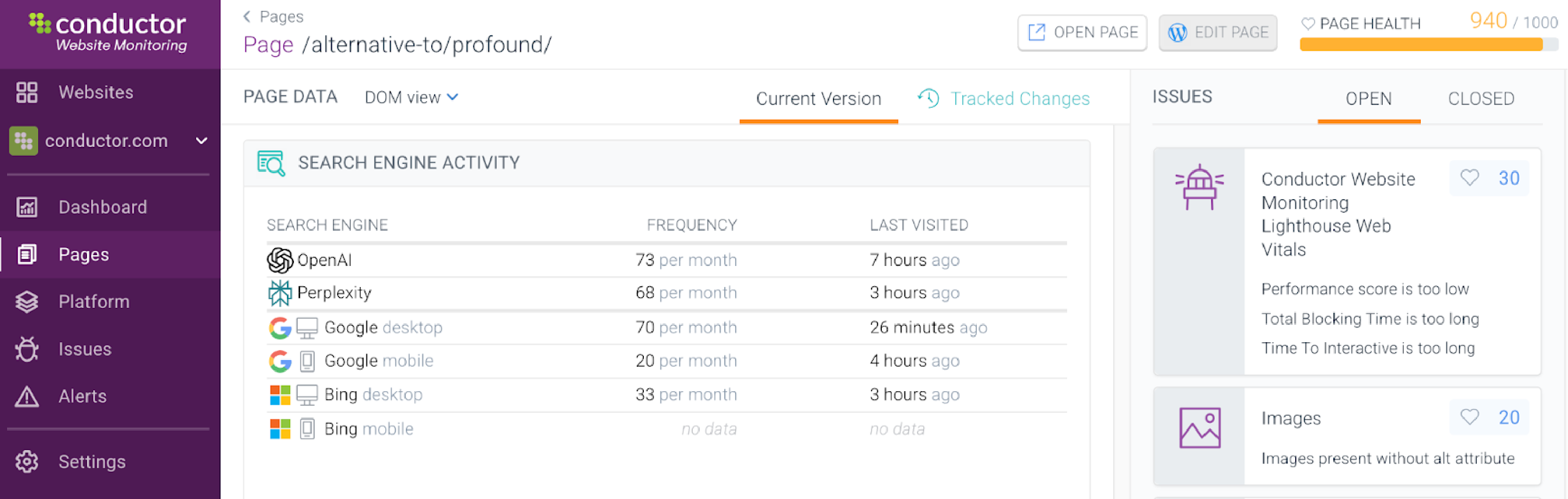
Search engine activity table in Conductor Monitoring comparing monthly crawl frequency and last visit timestamps for ChatGPT, Perplexity, Google desktop and mobile, and Bing.
The line graph in the screenshot below shows the frequency of crawls by each engine dating back to the publish date, July 24. Although Google mobile crawled the content first on July 24, within 24 hours, Perplexity had crawled it the same number of times, and ChatGPT had crawled it three times.
This breakdown shows the frequency of crawler visits across search and answer engines, as well as the date of the most recent visit.
As you can see, Google has largely caught up to the answer engines in terms of crawl frequency, with Google desktop visiting the page a little more than Perplexity and a little less than ChatGPT each month.
Bing and Google mobile, however, still show far fewer visits than either answer engine.
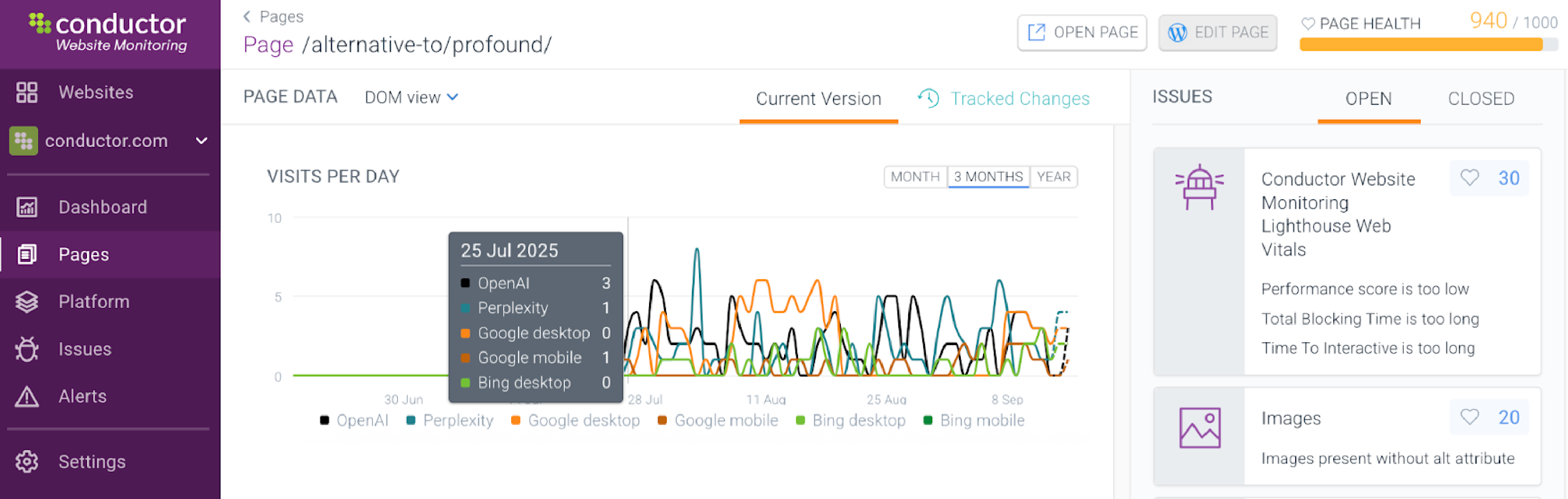
Line graph in Conductor Monitoring showing daily crawl activity over time from AI bots and search engines, including ChatGPT, Perplexity, Google, and Bing.
Key takeaways
A variety of technical issues can block AI crawlers from properly accessing, indexing, and understanding your content. Specifically, the following factors will impact an AI bot’s ability to crawl your content:
Unlike traditional search bots, the majority of AI crawlers do not render JavaScript and only see the raw HTML of a page. That means any critical content or navigation elements that depend on JS to load will remain unseen by AI crawlers, preventing answer engines from fully understanding and citing that content.
Using Schema, (or structured data), to explicitly label content elements like authors, key topics, and publish dates is one of the single most important factors in maximizing AI visibility. It helps LLMs break down and understand your content. Without it, you make it much harder for answer engines to parse your pages efficiently.
Are links on your site sending visitors to 404 pages? Is your site loading slowly? Technical issues like poor Core Web Vitals, crawl gaps, and broken links will impact how answer engines understand and crawl your site. If these issues persist for days or weeks, they will prevent AI from efficiently and properly crawling your content. That will then impact your site’s authority, expertise, and AI search visibility.
A frequent point of confusion is whether AI bots can bypass a login wall and crawl gated content. To be clear: LLMs and their crawlers cannot access content that requires a form fill, user login, password, or paid subscription.
AI crawlers operate as logged-out users. This means the content surrounding the login or paywall becomes critical. The metadata—title tags, descriptions, and Schema markup—on the content hub, landing page, or login page are what the LLM will crawl and use to represent your expertise. The landing page itself effectively becomes the "representative asset" that is cited or mentioned in AI search.
Useful resource: To learn how to balance lead generation with visibility, check out this guide on Gated Content and AI Discoverability.
Even if your robots.txt file is perfectly calibrated, some SEOs discover their work to make content crawlable is undone by CMS or hosting provider settings. Many shared hosting platforms and cloud firewalls block new or unrecognized user-agents, including LLM crawlers by default as a security measure against web scraping.
You may need to proactively check and configure your host-level firewall or your hosting provider's web application firewall (WAF) settings. If an LLM crawler is being blocked, the solution is often requesting an unblock from your host's support team or whitelisting the bot's IP ranges in the firewall settings, not just adjusting robots.txt.
One of the most common questions SEOs and AEOs face is how to manage the growing number of new AI and LLM user-agents visiting their sites. The key is balance: allowing legitimate crawlers visibility while protecting against malicious scrapers.
You can’t fix something if you don’t know it’s broken. You need insights into how your content is performing and any blockers that may be standing in the way of getting your website and content crawled by AI/LLMs.
One of the first steps to understanding your true AI crawlability is analyzing your server logs. While a dedicated monitoring platform is the definitive solution, recognizing crawler patterns is essential for any SEO or AEO.
From a traditional SEO perspective, you can check server logs or Google Search Console to confirm that Googlebot has visited a page. For AI search, that level of certainty just isn’t there. The user-agents of AI crawlers are new, varied, and often missed by standard analytics and log file analyzers.
That’s why the only way to know if your site is truly crawlable by AI is to have a dedicated, always-on monitoring platform that specifically tracks AI bot activity. Without a solution that can identify crawlers from OpenAI, Perplexity, and other answer engines, you’re left guessing. Visibility into your site’s crawlability is the first step; once you can see AI crawler activity on your site, you can leverage the benefits of real-time data to optimize your strategy.
Since AEO/GEO and AI answer engine visibility are still in their infancy, the industry is experimenting with ways to optimize for AEO and become a go-to trusted source among answer engines.
Conductor Monitoring is built to help you navigate this shift with 24/7 intelligence and a suite of features that offer insights into if, when, and where AI bots are crawling your content. With Conductor Monitoring, you can see:
Emerson is a global leader in automation, helping to transform industrial manufacturing. The Emerson website has over 1 million distinct webpages and operates in more than 30 different locales.
It was a huge undertaking to crawl and monitor all of those pages on their own, especially considering the different languages and nuances of each locale. As a result, it would take Emerson days just to crawl their English US locale pages, which resulted in issues going unnoticed for extended periods of time. By the time they identified the issues, their performance and visibility had already been impacted, in both AI search and traditional search engines.
The Emerson team decided to leverage Conductor Monitoring to crawl and monitor their content 24/7 across 1M+ pages, along with complex business and product segments. Conductor Monitoring alerted the team to any issues as they appeared, even prioritizing the issues to triage based on business impact. This made it easy for the team to identify issues and take action to resolve them.
Altogether, Conductor Monitoring helped Emerson reduce technical issues by 50% and improve their discoverability for answer engines.
Want to try this out for yourself? Get the around-the-clock monitoring you need to oversee and optimize every page of your website with a Conductor Monitoring free trial.
Here are a few initiatives you can employ to improve the chances of your content being crawled and understood by AI crawlers, and, in turn, increase citations and mentions in AI search.
All of this comes down to making sure you’re keeping an eye on your site from a technical and UX perspective. AI is changing a lot about how people search and interact with brands online, but it’s not changing the fact that answer engines and search engines still want to drive users to expert and authoritative websites that are technically sound.
Many teams are frustrated when answer engines display inaccurate or inconsistent information. Keep the following things in mind as you troubleshoot incorrect or outdated information:
The search landscape has fundamentally changed. Gone are the days when you could rely on scheduled crawls and traditional ranking tracking to understand your online performance. As we've seen, answer engines move fast, and your brand's visibility can change in an instant. Staying ahead of the curve requires a new level of agility and insight that yesterday's tools can't provide.
A proactive AEO strategy, powered by real-time intelligence, makes all the difference. By keeping a constant eye on AI crawler activity, performance scores, schema implementation, and author signals, you can stop guessing and start making data-driven decisions that protect and grow your presence in AI search.
Success in this new era isn't just about fixing what's broken; it's about building a resilient digital presence that answer engines' trust and promote. By leveraging the real-time monitoring features we've covered, you can get a single source of truth for your website’s technical health and AI crawlability, turning reactive fire drills into a proactive strategy for sustainable growth.
Don’t leave your discoverability to chance. Make sure answer engines are crawling your most important content and pinpoint pages that AI crawls miss to find opportunities to optimize with a Conductor Monitoring free trial.

Shannon Vize - Sr. Content Marketing Manager and Team Lead, Conductor
Shannon is the Sr. Content Marketing Manager and Team Lead at Conductor. She believes all writing - from long-form to social copy - is an opportunity to educate, connect, and inspire. Shannon also serves as the Communications Co-Chair of the Women of Conductor Resource Group. She is passionate about creating an inclusive and diverse work environment and helping support women in business and beyond.
Conductor is an enterprise-level platform helping brands understand and improve how they’re discovered across traditional search and AI-powered experiences. By unifying SEO, AEO, content, and technical performance into one workflow, Conductor enables teams to turn data into clear strategy, measurable impact, and long-term visibility.