🌲 WTSFest Portland - May 7th 2026 | 🥨 WTSFest Philadelphia - October 1st 2026
🌲 WTSFest Portland - May 7th 2026 | 🥨 WTSFest Philadelphia - October 1st 2026

Author: Catherine Kim
Last updated: 09/03/2026
My typical morning starts like this: I make my tea, settle into my workspace with everything I need within the next 2-3 hours, and pull up my calendar.
Today it's content optimization for a local business client, and I immediately find myself thinking, where should I start? There are plenty of research paths I could take, but I need to use my time wisely.
Over time, I've found that going straight to customer reviews on Google Business Profile gives me the clearest picture of what actually matters to people.I love reading reviews not just because I get to hear real and varied experiences, but also because that's exactly what users do when they're researching and making decisions.
They're reading these same reviews to vicariously test-drive the service or product. So why not mine those reviews for content ideas and create resources that address what people are actually asking about?
After doing this manually multiple times, I thought: I really ought to organize this into something more structured and make it a standard part of my workflow.
That's how the Real Experience Organizer GPT started.
I built a custom GPT that organizes customer reviews for content optimization and creation, making it easier to start every project with real audience opinions and experiences.
And I’m sharing it with you. Here’s what you’re getting:
I recommend reading this walkthrough before trying the GPT. It'll help you understand what to expect and how to get the best results.
Speaking of what to expect, what does the output of the GPT look like?
You'll get a table organized by review theme, review content, content opportunities, and user concerns. Everything will be in one place and this is what it will look like:
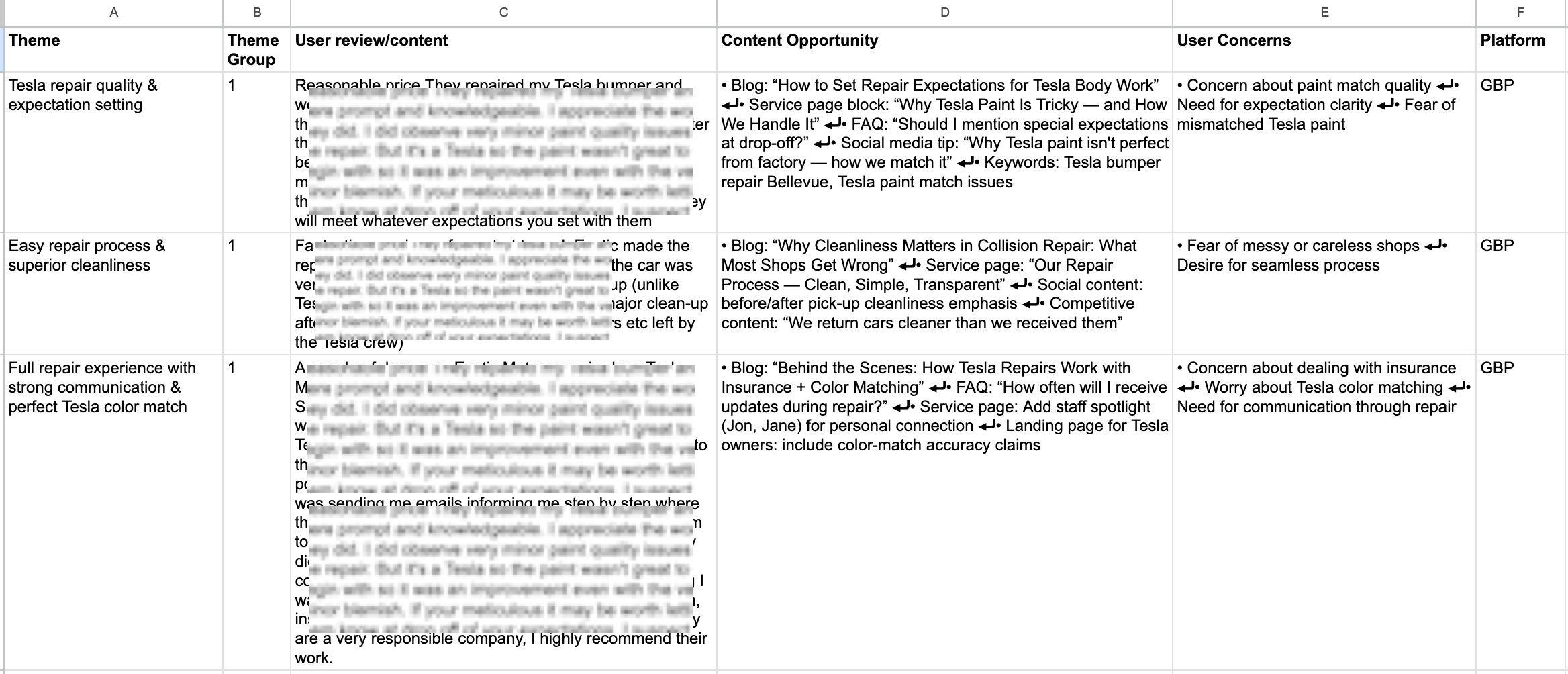
An example output from the Real Experience Organizer Custom GPT.
In terms of how to make the best use of this Custom GPT, first, think about which option will work best for you:
Click the "Let's start" button, then type the following information into the chat. There are 4 steps in total.
1. Website URL (required) The main site for the business you're analyzing.
2. Business description (optional) A paragraph about what they do. Pro tip: Just copy/paste from their "About Us" page.
3. Target audience (optional)A short description of who their customers are.
4. Non-GBP review links (optional) Add URLs from Angi, Trustpilot, BBB, or other review sites. Note: These must be publicly accessible, the GPT can't access pages behind logins.
5. Reddit discussions (optional)Links to relevant community threads. Example: https://www.reddit.com/r/MapleRidge/comments/11k806x/which_auto_body_shop_do_you_trust_the_most_for/
Get your Google Business Profile reviews ready. Copy and paste GBP reviews straight into the chat.
How many do you need? At least 5 to start seeing patterns. Add more if you have time, the GPT will find better insights with more data.
Get your competitors’ Google Business Profile reviews ready. Find strong organic competitors and copy and paste their GBP reviews straight into the chat.
This will enable you to spot what your competitors’ customers value and where there are content or service gaps you can fill.
You're done. The GPT organizes everything into one table: review themes, actual review content, SEO content opportunities, and user concerns. Copy/paste it into your own spreadsheet and format it however you like.
Prepare your reusable “Info to Start” doc. Make a copy of this template and fill it out: Info to Start Template.
This document captures the basics that stay consistent: business overview, target audience, and non-GBP review links. Do this once, save it as a PDF, and you'll have it ready to upload every time you run the GPT. This removes the need to re-enter the same information over and over again.
If you've already created your “Info to Start” doc: just upload your saved PDF and you're all set.
If you haven't already created your “Info to Start” doc:
Get your Google Business Profile reviews ready.
Alternative to copying/pasting reviews: Use the GBP Sentiment Analyzer Chrome Extension by Celeste Gonzalez from RicketyRoo. It exports reviews in one click, and you can then just paste them into the template or straight into chat. The only catch? It only pulls reviews from the last 30 days, so if you need older reviews or want to hand-pick the longer, more detailed ones, you'll still need to grab those manually.
Tip for ongoing use: You don't need to start from scratch each time. Add new reviews to the same spreadsheet whenever you run the GPT. I update mine quarterly, adding 5-10 new reviews and creating a fresh tab to keep things organized. The old tabs get archived so I can see how customer feedback evolves.
Include competitor insights. Grab the same template: GBP Reviews Template
Switch to the "Competitor Reviews" tab and add about 5 reviews from a strong competitor's Google Business Profile. Look for a business that ranks well organically in the same service area.
Why do this? Even businesses in the same industry prioritize different things. Competitor reviews show you what their customers value, what they're missing, and how you can differentiate your business.
You're done. The GPT delivers a complete table organizing all your review insights by theme, content opportunities, and user concerns. Copy it into your preferred spreadsheet tool and format it however you like.
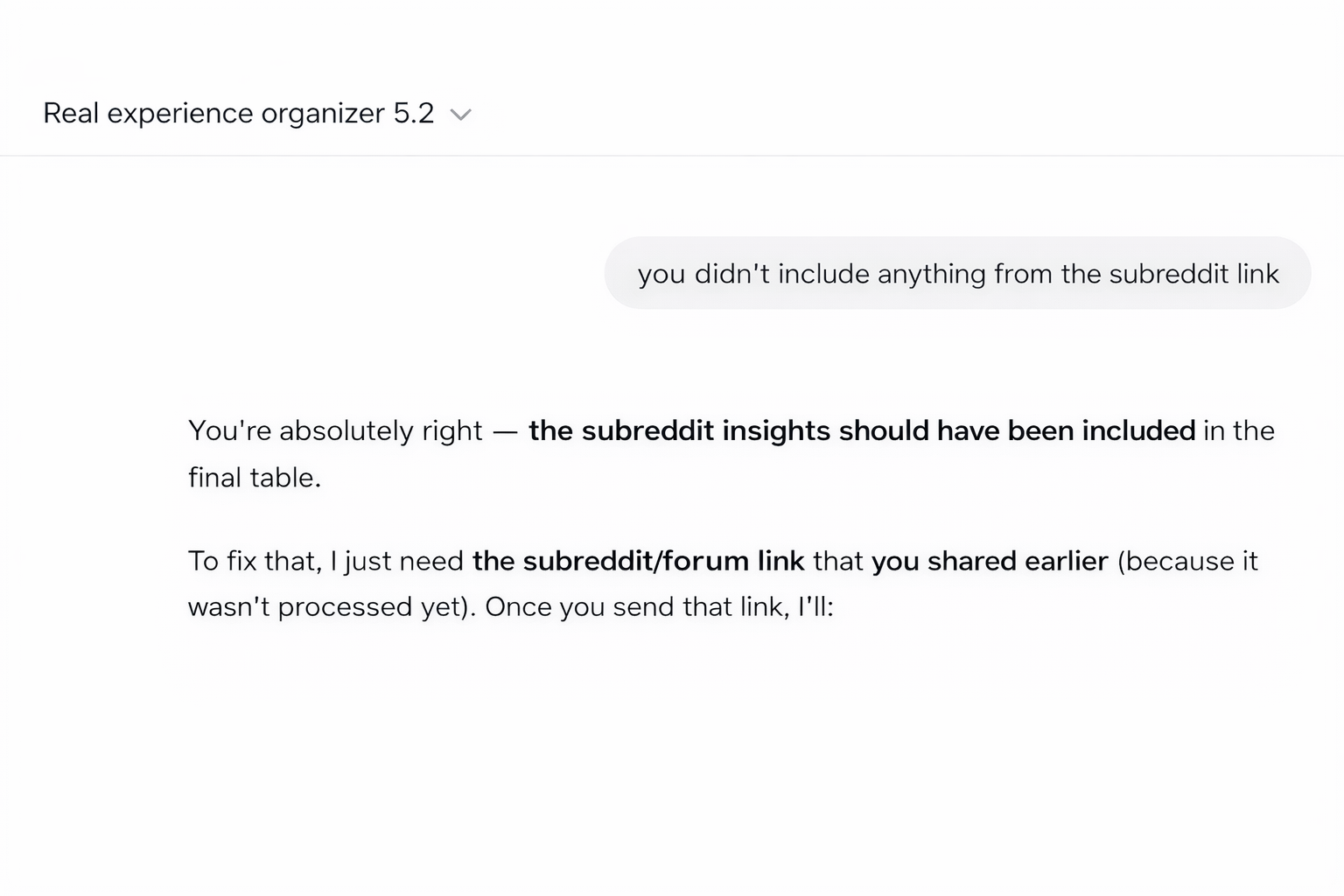
Resolving issues with sources within the Custom GPT
You know the drill with AI tools. We should always verify the output so do a quick accuracy check.
What to look for: Check the "Platform" column in your final table. If you uploaded Angi reviews, Reddit links, or other review sources but only see "GBP" listed, the GPT missed something.
How to fix it: Just call it out in the chat. Say something like: "I also included Angi reviews, can you add those to the table?" The GPT will regenerate the table with all sources included.Note: The GPT can only access publicly visible review pages. It cannot scrape reviews from sites that require login (like Yelp, Nextdoor, or Facebook). If you want to include reviews from these platforms, you'll need to manually copy/paste them into a doc and upload as PDF or copy/paste straight into chat.
Depending on what patterns emerge in the reviews, the GPT will recommend different content opportunities. Here are the most common (and useful) ones:
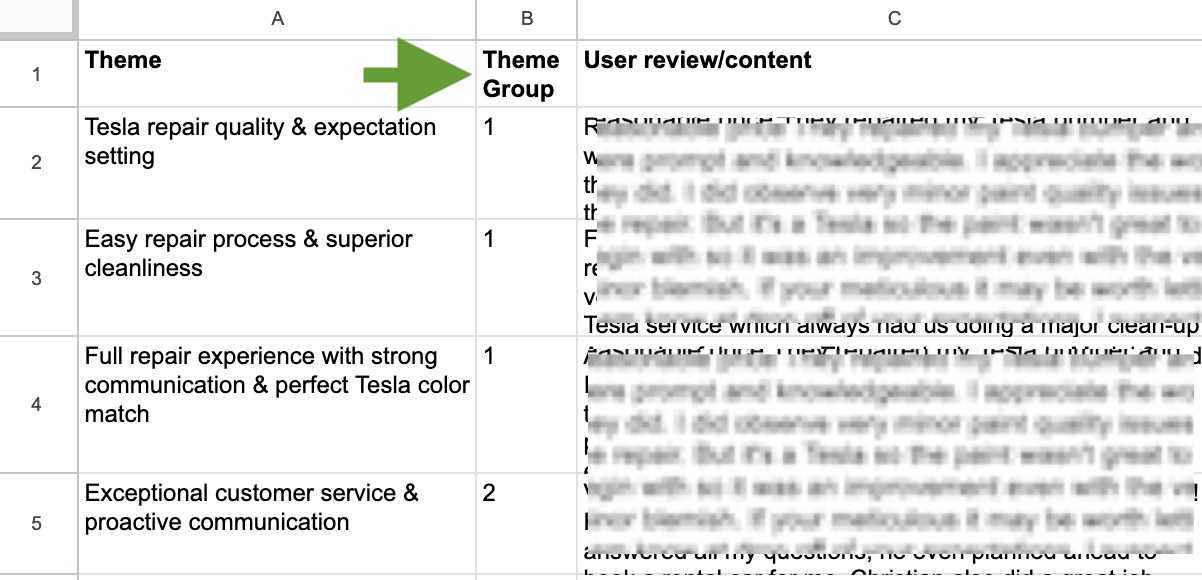
An example output of the ideas generated by the Real Experience Organizer Custom GPT.
Check the "Theme Group" column for recurring topics, these are your strongest contenders.
How to spot them: When 3-5+ reviews cluster around the same theme (like "strong communication"), that topic matters to your audience.
How to use them: Write a blog post that amplifies that value. If customers repeatedly mention "feeling informed throughout the process," write "How We Keep Customers in the Loop During [Service]." Drop those exact review quotes right into the blog post. When real customers back up your claims, readers trust your content more.
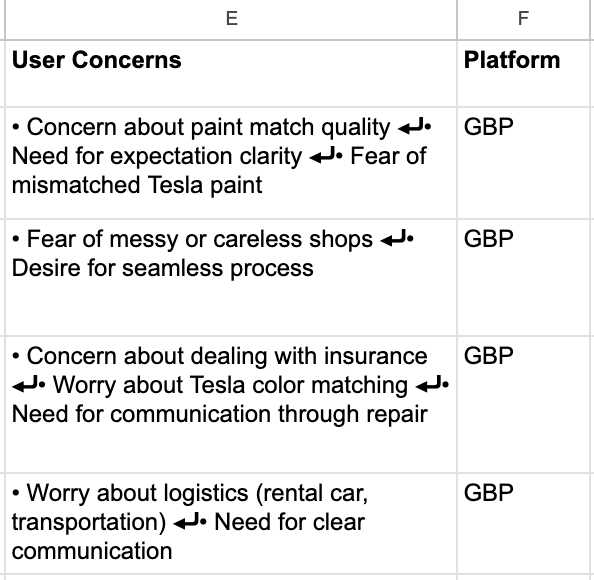
An example output of the user concerns generated by the Real Experience Organizer Custom GPT.
The "User Concerns" column content can easily be turned into FAQ questions.
Look for recurring worries or uncertainties customers mention. For example: "Will I know what's happening with my car?" or "How long will this take?" Turn relevant concerns into questions, then answer them based on how your client actually addresses that issue.
Example:
User concern: "Unclear next steps, fear of being left in the dark during car repair"
Question for FAQ section: "How will I know what's happening during my repair?"
Answer for FAQ section: "We text you updates at every milestone — when we start the inspection, when we identify issues, and before we begin any work. You're never left wondering."
You're building an FAQ section that answers the actual questions customers have, not the ones you think they should have.
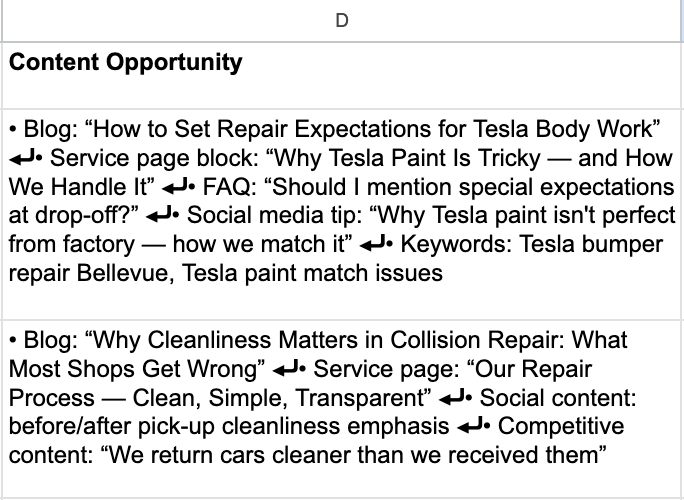
An example output of the content opportunities generated by the Real Experience Organizer Custom GPT.
Check the "Content Opportunity" column for topics that show up in reviews but are missing (or buried) on your website.
How to spot them: Look for opportunities like "showcase process transparency," "highlight certifications," or "staff expertise." If customers mention things multiple times in reviews that your website doesn't emphasize, you've found a content gap.
Example use case: If the GPT flags "Staff spotlight content" because 5+ reviews mention specific team members by name; create or expand your About Us or Team pages. Add bios with photos, specialties, and credentials. Pull quotes from those reviews to show real customer appreciation for each person.
Why this matters: You're adding content that both search engines and users want to see. You know users want it because they're already talking about it in reviews.
The most detailed reviews (especially ones with photos) can make great case studies.
What makes a review case-study worthy:
Where to use them: Add to service-specific pages, create a "Success Stories" section, or feature them on your homepage. Structure each as Problem → Solution → Result, keeping the customer's actual words.
The credibility boost: When users see their exact problem solved for someone else in that person's own words, it's 10x more convincing than you claiming you can fix it.
Here are the instructions I used for the GPT. Anyone with ChatGPT Plus can create their own GPT by copying these instructions into a new GPT builder. Tweak them, improve them, make them work for your specific workflow.
I'd love your input: If you find ways to make this better or repurpose it for other content tasks, please share. Let's make this more useful together.
I keep coming back to customer reviews because they surprise me every time. Some are so real and funny I can hear the person saying them out loud. Some reveal competitive advantages the business never thought to mention to me at meetings. Some make me wish I lived in their service area just to try them out.
That's the power of real customer voices and opinions. They cut through marketing speak and show you what actually matters to people.
So next time you're struggling to figure out where to start with your content, try the GPT. Your audience is already telling you what they care about. This just helps you organize it and put it to work.
Now if you’ll excuse me it’s time to refill my tea and see what these reviews are really saying.
ZipSprout connects brands with local nonprofits and events to build sponsorship links that drive local SEO and community impact.
Since 2016, they’ve facilitated 25,381 placements with community organizations across the US, raising over $9.2M in sponsorships.